

Unlock the Power of Automation: Explore Selenium with BDD Framework (Cucumber) for Efficient Testing
TABLE OF CONTENTS
- BDD – Behavior Driven Development
- Cucumber – A BDD Framework Tool
-
Steps To Use Selenium With Cucumber Framework
- 1. Setup
- 2. Create a Maven project in Eclipse and create a package for Java and a feature file
- 3. Update pom.xml with the below Cucumber Dependencies
- 4. Create Folder Features & Create feature file in that (Example : searchFeature.features) which contains scenario as per given Condition (Given, When, Then)
- 5. Create a Java class search.java under the package (src/main/java/package) which contains the steps definition
- 6. Run the feature file with the Run as Cucumber feature option to execute the scenario
- 7. Create a runner class to run single/multiple feature files. Run it as TestNG /Junit Annotations used- Cucumber Options
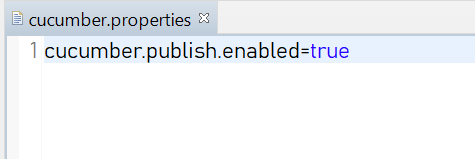
- 8. To create a cucumber report, create a cucumber.properties file and write – cucumber. publish.enabled=true
- Conclusion
- Stay ahead of the curve
Share on Social Media
Related Blogs

Importance of UI/UX to Build the Best Website Design for Your Business
Read More: Importance of UI/UX to Build the Best Website Design for Your Business
What is Artificial Neural Network (ANN)?
Read More: What is Artificial Neural Network (ANN)?
Understanding Async and Await in C# Programming : A Simplified Guide to Asynchronous Programming in C#
Read More: Understanding Async and Await in C# Programming : A Simplified Guide to Asynchronous Programming in C#
MongoDB Replica Set – Ensuring Reliability & High Availability for Your Data Storage
Read More: MongoDB Replica Set – Ensuring Reliability & High Availability for Your Data Storage
In this dynamic digital landscape, automating tests is crucial for ensuring the reliability and efficiency of software applications. Selenium, a powerful automation tool, combined with the Behavior-Driven Development (BDD) framework, Cucumber, offers a robust approach to testing. In this comprehensive guide, we’ll explore how this tandem simplifies test creation, enhances collaboration between teams, and empowers you to create automated tests that not only find bugs but also document application behavior in plain language. Join us on this journey to streamline your testing processes and elevate software quality.
BDD – Behavior Driven Development
- It is a technique of agile software development in which test cases are written in a simple text language that even non-programmers can understand.
- The aim of a Behavior-Driven Development (BDD) framework is to unite diverse project roles, including quality assurance professionals, developers, and business analysts, in order to gain a comprehensive understanding of the application without delving excessively into its technical complexities.
- Testers create automated test cases using plain language that customers can easily understand.BDD test automation frameworks then interpret these executable specifications written in straightforward English to verify the success of these tests.One of such framework tools is CUCUMBER.
Cucumber – A BDD Framework Tool
- Cucumber is a Behavior Driven Development (BDD) framework tool to write test cases. It works based on Given – When – Then Approach.
- Gherkin is a plain English text language, which helps the tool – Cucumber to interpret and execute the test scripts.
BDD Framework Integration Available with Tools
- Test Framework: TestNG, JUnit
- Build Tools: Maven, Ant
- CI/CD – Jenkins
CUCUMBER ANNOTATIONS: Annotations are predefined text that contain specific meaning. It allows the compiler to know what should be done during execution.
- Given: Some given context (Preconditions).
- When: Some Action is performed (Actions).
- Then: Output after the above step (Results).
- And: Between any two statements, it gives the logical AND condition. AND can be combined with the GIVEN, WHEN, and THEN statements.
- But: Between any two statements, it gives the logical OR condition.
Steps To Use Selenium With Cucumber Framework

1. Setup
- JDK
- Eclipse
- Install the cucumber plugin from eclipse Marketplace
2. Create a Maven project in Eclipse and create a package for Java and a feature file
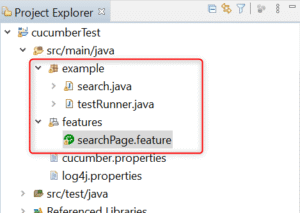
3. Update pom.xml with the below Cucumber Dependencies
Cucumber-javaCucumber-junit / TestNG4. Create Folder Features & Create feature file in that (Example : searchFeature.features) which contains scenario as per given Condition (Given, When, Then)
SearchPage. feature
Feature: Test Google Search Functionality
Scenario: Search and verify page title
Given  #. User is on Google Search page
When #. User search with cucumber framwork keyword
And #. Click on selection options
Then #. User is redirected to search result page
5. Create a Java class search.java under the package (src/main/java/package) which contains the steps definition
package example;
import org.openqa.selenium.By;
import org.openqa.selenium.WebDriver;
import org.openqa.selenium.chrome.ChromeDriver;
import org.testng.Assert;
import org.testng.annotations.Test;
import io.cucumber.java.After;
import io.cucumber.java.Before;
import io.cucumber.java.en.And;
import io.cucumber.java.en.Given;
import io.cucumber.java.en.Then;
import io.cucumber.java.en.When;
import io.github.bonigarcia.wdm.WebDriverManager;
public class search {

    private static WebDriver driver;

    @Before
    public void setUp() throws InterruptedException {
        WebDriverManager.chromedriver().setup();
        driver = new ChromeDriver();
        Thread.sleep(10);
        driver.manage().window().maximize();
    }

    @Test
    public void checkTest()
    {
        System.out.println("Testing");
    }
    @Given("#. User is on Google Search page")
    public void open_login_page() throws Throwable
    {
         driver.get("https://www.google.co.in/");
        System.out.println("1. Go to Google search page");
    }
    @When("#. User search with cucumber framwork keyword")
    public void enter_credentails() throws Throwable
    {
       System.out.println("2. Search with cucumber framwork keyword.");
       driver.findElement(By.xpath(".//textarea[@title='Search']")).sendKeys("cucumber framework");
     Thread.sleep(10);
      driver.findElement(By.xpath(".//img[@alt='Google']")).click();
      Thread.sleep(10);
    }

    @And("#. Click on selection options")
    public void click_login(){
        System.out.println("3. Click on Google search button");
        driver.findElement(By.xpath("(.//input[@value='Google Search'])[last()]")).click();
    }
    @Then("#. User is redirected to search result page")
    public void redirect_homePage() throws Throwable
    {
        System.out.println("4. User is redirected to search result page");
        String actTitle = driver.getTitle();
        String expTitle = "cucumber framework - Google Search";
        Assert.assertEquals(actTitle,expTitle);
    }

    /*
     * @After public void teardown() { driver.quit(); }
     */
}
6. Run the feature file with the Run as Cucumber feature option to execute the scenario
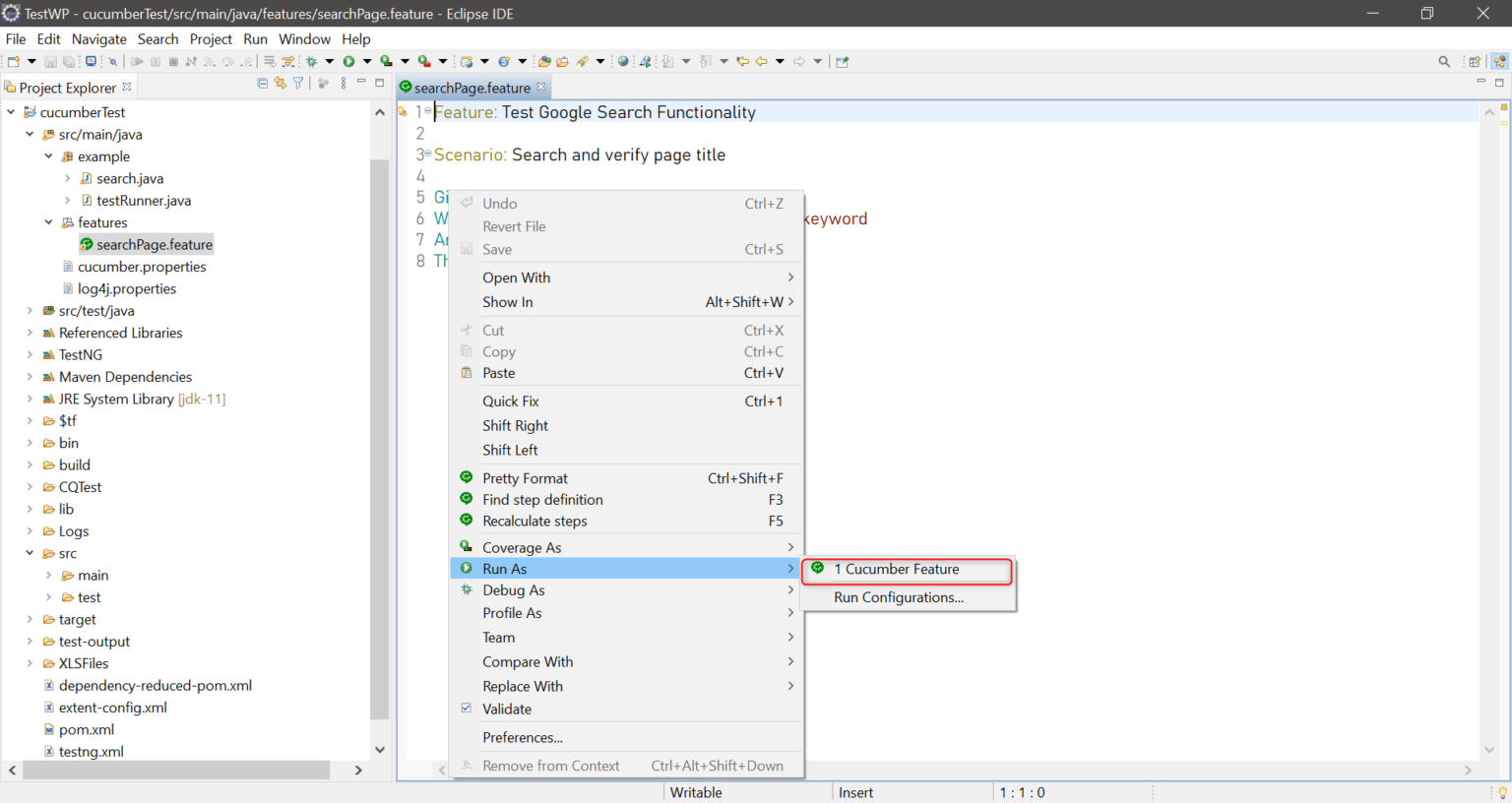
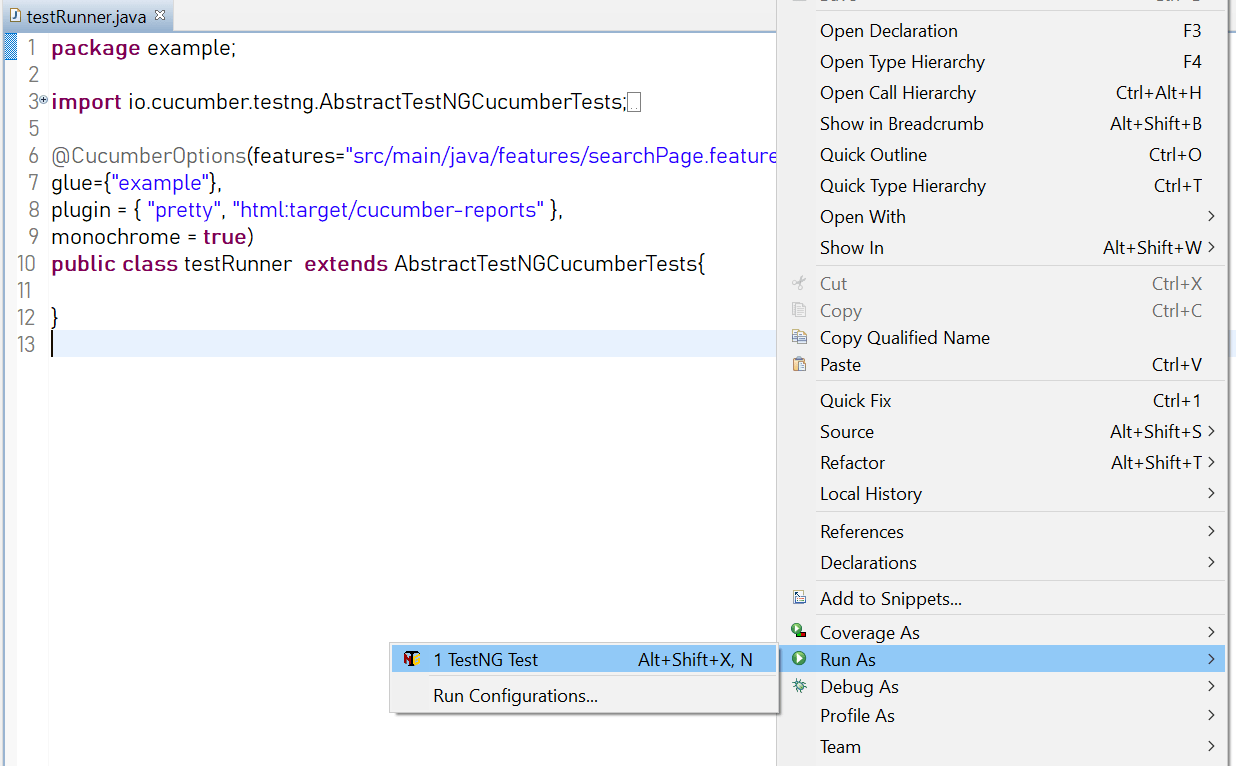
7. Create a runner class to run single/multiple feature files. Run it as TestNG /Junit Annotations used- Cucumber Options
- Features – Path of feature file
- Glue– path of Java class
File Name : testRunner.java
package example;
import io.cucumber.testng.AbstractTestNGCucumberTests;
import io.cucumber.testng.CucumberOptions;
@CucumberOptions(features="src/main/java/features/searchPage.feature",
glue={"example"},
plugin = { "pretty", "html:target/cucumber-reports" },
monochrome = true)
public class testRunner  extends AbstractTestNGCucumberTests{
}
8. To create a cucumber report, create a cucumber.properties file and write – cucumber. publish.enabled=true
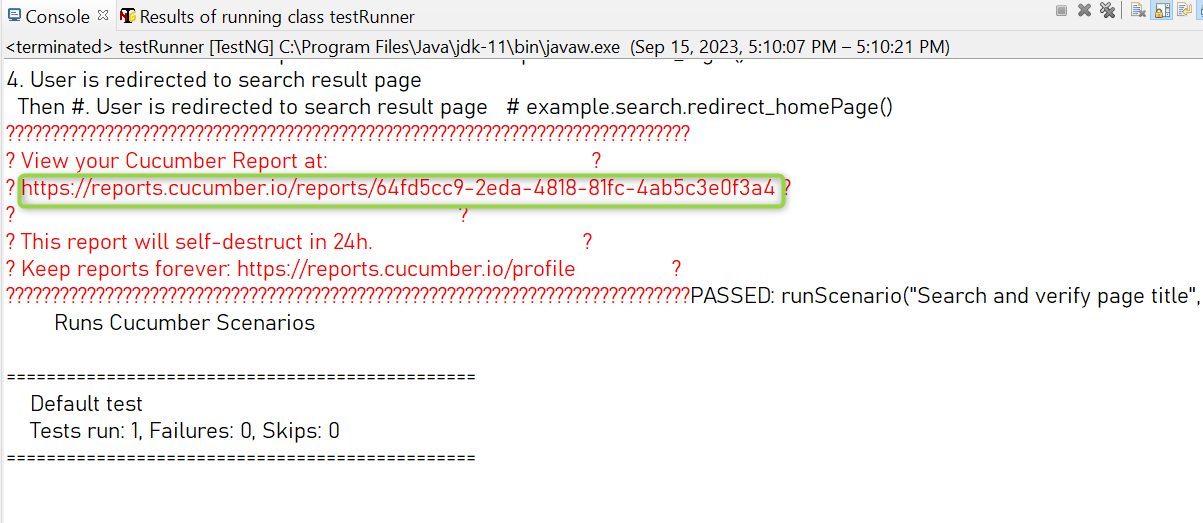
After execution, the report link will be displayed in the console as below:
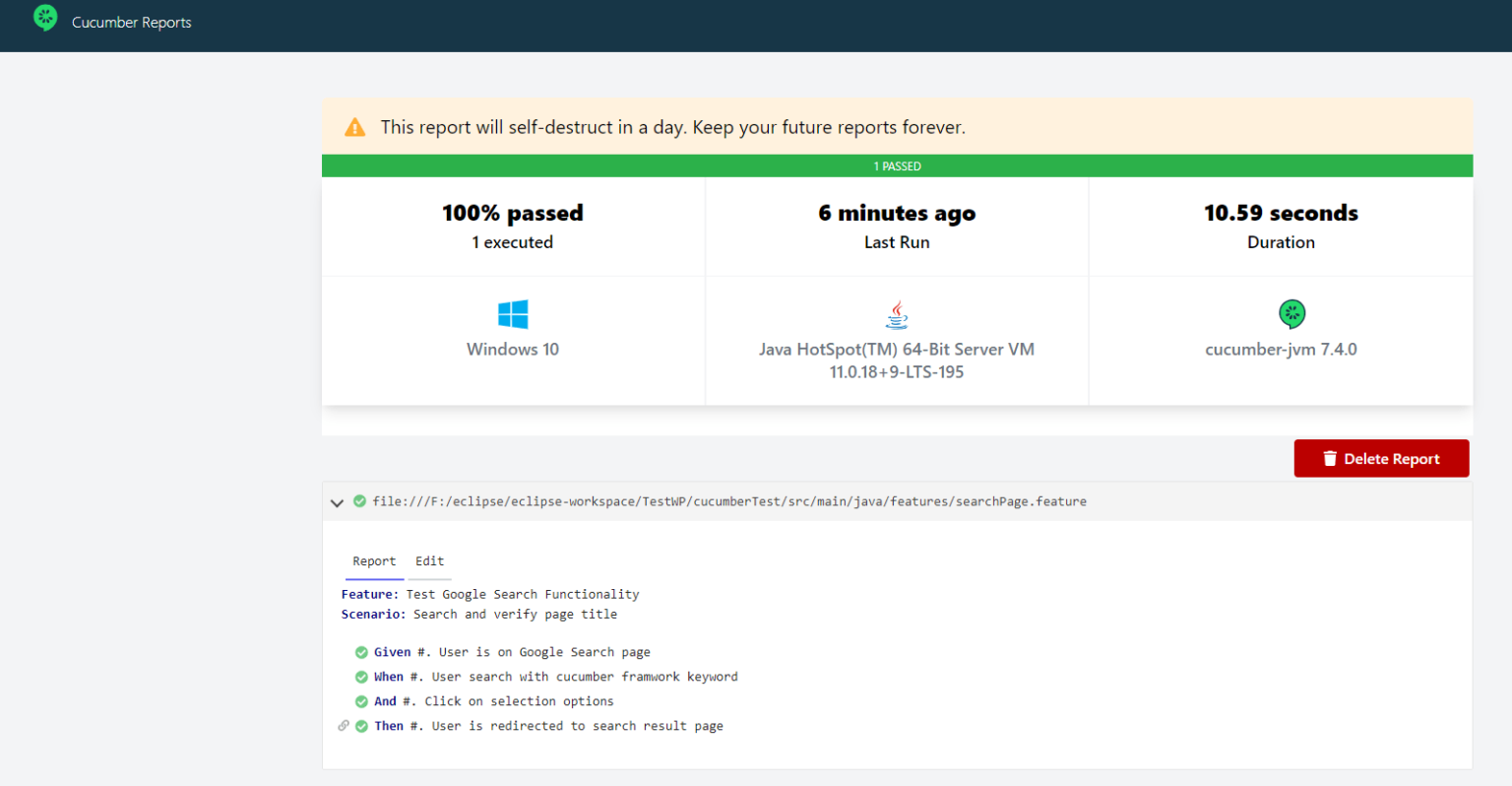
The report will be displayed like this:
Conclusion
Behavior-Driven Development (BDD) offers the capability for the entire team, including members who may not possess deep technical expertise to participate in writing and testing software. While BDD does present challenges, such as translating plain English (non-technical) text into actual code. Overall, BDD serves as an invaluable guideline to ensure the development of the right software in the right manner.
Share on Social Media
Related Blogs

Why Choose Cross-Platform Mobile App Development? Which Technology Is The Best?
Read More: Why Choose Cross-Platform Mobile App Development? Which Technology Is The Best?MongoDB Replica Set – Ensuring Reliability & High Availability for Your Data Storage
Read More: MongoDB Replica Set – Ensuring Reliability & High Availability for Your Data Storage
Basics of NLP : Zero to One
Read More: Basics of NLP : Zero to One
Effective Strategies for Software Development Estimation: A Comprehensive Guide
Read More: Effective Strategies for Software Development Estimation: A Comprehensive GuideStay ahead of the curve
Get the latest insights, tutorials, and industry news delivered straight to your
inbox. Join 10,000+ developers and tech leaders.